Tuesday, 14 June 2016

MongoDB installation on windows


MongoDB installation : 


In this post we are going to see installation of mongoDB on windows machine. 

Installation of mongoDB is very simple. Just download the .msi  file from mongoDB website and execute it by pressing next, next,..Finish.

You can download it from below mentioned Hyperlink.


Once you downloaded, double click on the file to run.


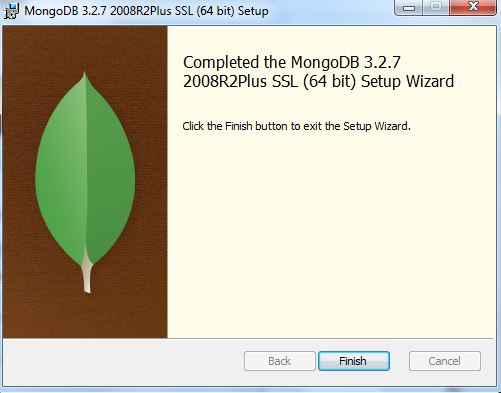
Then a wizard will be opened as shown in the below figure.


Click on NEXT, and accept the service agreement, then click on install to finish installation.


That's all. You've successfully installed mongoDB in your windows machine.


Adding Environment variables :


After completion of installation, we should add the "MongoDB BIN" location to environmental variables. To do this, first check where the mongoDB has been installed on your windows machine. By default, it will be installed in "\Program Files" on the current volume on windows. In my case it was, 

C:\Program Files\MongoDB\Server\3.2\bin

Go to the "bin" directory and copy the complete path. Here, you can see that all MongoDB package components are placed here.


Now, go to the "system properties", and add the copied path to "PATH" variable under "Environment variables  ==>  system variables".

We are done !!


Test run : 

Open a command prompt, and just type 'mongod' to start mongod server on default port i.e. 27017.

When we run with no arguments, mongod will use the default data directory,  \data\db\ on the current volume on Windows. If the data directory does not already exist or is not writable, the server will fail to start. It is important to create the data directory (e.g., mkdir  data\db) and to make sure your user has permission to write to the directory before starting MongoDB.


On startup, the server will print some version and system information and then begin waiting for connections. By default MongoDB listens for socket connections on port 27017. The server will fail to start if the port is not available. The most common cause of this is another instance of MongoDB that is already running.

mongod also sets up a very basic HTTP server that listens on a port 1,000 higher than the main port, in this case 28017. This means that you can get some administrative information about your database by opening a web browser and going to http://localhost:28017

You can safely stop mongod by typing Ctrl-C in the shell that is running the server.


MongoDB shell : 

MongoDB comes with a JavaScript shell that allows interaction with a MongoDB instance from the command line. The shell is useful for performing administrative functions, inspecting a running instance, or just playing around. The mongo shell is a crucial tool for using MongoDB and is used extensively throughout the rest of the text.

Running the shell

To start the shell, run mongo executable :


On startup, the shell connects to the test database on a MongoDB server and assigns this database connection to the global variable db. This variable is the primary access point to your MongoDB server through the shell.

To see the database db is currently assigned to, type db and hit Enter:


** Next post : MongoDB CRUD operations


Wednesday, 8 June 2016

MongoDB overview

Understanding MongoDB :


MongoDB is an agile and scalable NoSQL database. The name Mongo comes from the word humongous. MongoDB is based on the NoSQL document store model, in which data objects are stored as separate documents inside a collection instead of in the traditional columns and rows of a relational database. The documents are stored as binary JSON or BSON objects.

The motivation of the MongoDB language is to implement a data store that provides high performance, high availability, and automatic scaling. MongoDB is extremely simple to install and implement, as you will see in upcoming posts. MongoDB offers great website back-end storage for high-traffic websites that need to store data such as user comments, blogs, or other items because it is fast, scalable, and easy to implement.


  • MongoDB is an open-source database developed by 10gen, for a wide variety of applications.
  • Document oriented : Because MongoDB is document oriented, the data is stored in the database in a format that is very close to what you will be dealing with in both server-side and client-side scripts. This eliminates the need to transfer data from rows to objects and back.
  • It is an agile database that allows schema's to change quickly as application evolve. It means that MongoDB has flexible schema / dynamic schema.
  • High performance : MongoDB is one of the highest-performing databases available. Especially in today’s world, where many people interact with websites, having a back end that can support heavy traffic is important.
  • Replication & high availability : MongoDB’s replication model makes it easy to maintain scalability while keeping high performance and scalability. Below figure shows the "Basic replication set in MongoDB". The green color box is Primary, where all write operations are going and maroon color boxes are Secondary, which will get replicated from Primary. 
Fig : Replication in MongoDB

  • High scalability : MongoDB’s structure makes it easy to scale horizontally by sharding the data across multiple servers.
Fig : Sharding in MongoDB

  • By leveraging in-memory computing i.e. MongoDB processes most of the queries in-memory it-self, that's why it is so fast.
  • MongoDB's native replication and automated fail-over enables reliability and  flexibility.
  • MongoDB written in C++. (That's why it is light weight)
  • MongoDB has got full index support. We will see what are all the indexes MongoDB supports in "INDEXES" posts.
  • MongoDB supports Map - Reduce functions also. We will see in detail in our upcoming posts.
  • Grid FS : It is the solution from MongoDB to store large files like Video files, audio files, images etc.

MongoDB features : 

  • MongoDB has got support from almost all programming languages like Java, Python, Ruby etc. In this tutorial we will use Python. 
  • Hadoop Integration.
  • Aggregation framework and native Map-Reduce.
  • Rich secondary indexes, including geospatial and TTL (Time To Live) index.
  • Built-in replication for high availability.
  • Auto sharding for horizontal scaling.
  • JSON data model with Dynamic/Flexible schema.

MongoDB Database : 

Mongod is the primary daemon process for the MongoDB system. Database is the physical container for collections. Each database gets its own set of files on the file system. It acts as a server, typically has multiple databases. It handles data requests, manages data format and performs background management operations.


Collections in MongoDB : 

MongoDB groups data through collections. A collection is simply a grouping of documents that have the same or a similar purpose. A collection acts similarly to a table in a traditional SQL database. However, it has a major difference: In MongoDB, a collection is not enforced by a strict schema. Instead, documents in a collection can have a slightly different structure from one another, as needed. This reduces the need to break items in a document into several different tables, as is often done in SQL implementations.

Fig : MongoDB collections in a single database


Documents in MongoDB : 


A document is a representation of a single entity of data in the MongoDB database. A collection consists of one or more related objects. A major difference exists between MongoDB and SQL, in that documents are different from rows. Row data is flat, with one column for each value in the row. However, in MongoDB, documents can contain embedded subdocuments, providing a much closer inherent data model to your applications.
In fact, the records in MongoDB that represent documents are stored as BSON, a lightweight binary form of JSON. It uses field:value pairs that correspond to JavaScript property:value pairs that define the values stored in the document. Little translation is necessary to convert MongoDB records back into JSON strings that you might be using in your application.
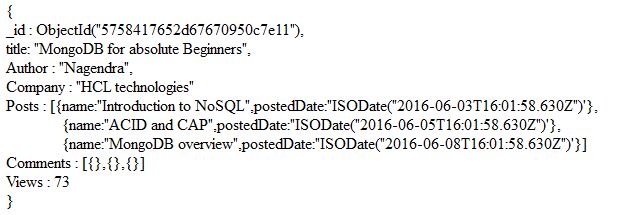
For example, a document in MongoDB might be structured similar to the following, with title, Author, Company, Posts, Comments and Views fields:
Fig : A sample document in MongoDB

For more details on JSON, I recommend you to visit http://json.org/


RDBMS terminology with MongoDB :

I hope that below table is self explanatory. Just have a look.


**_id field is mandatory filed in MongoDB document i.e. you can't have any document in MongoDB without having _id field. It acts as a Primary key. User need not to insert "_id" field while creating MongoDB collection i.e. MongoDB inserts _id field to the each document automatically.

**MongoDB doesn't support joins and transactions. Don't worry, we will discuss more on this when we talk about "Schema design in MongoDB".

Note : From MongoDB 3.2 left joins are supported through the $lookup operator. (But conditions apply)


** Next Post : "MongoDB installation on windows"


Tuesday, 7 June 2016

ACID and CAP

ACID property in SQL :

I know, you people know about what ACID property is. Anyway lemme explain it in brief manner.

RDBMS and SQL supports transactions. A database transaction is, "a transformation of state" that has the ACID properties. A key feature of transactions is that they execute virtually at first, allowing the programmer to undo (using ROLLBACK) any changes that may have gone awry during execution; if all has gone well, the transaction can be reliably committed. Let's take a moment to revisit what this really means.

ACID is an acronym for Atomic, Consistent, Isolated, Durable, which are the gauges we can use to assess that a transaction has executed properly and that it was successful:


Fig : ACID property

Atomic : 
      Atomic means “all or nothing”; that is, when a statement is executed, every update within the transaction must succeed in order to be called successful. There is no partial failure where one update was successful and another related update failed. The common example here is with monetary transfers at an ATM: the transfer requires subtracting money from one account and adding it to another account. This operation cannot be subdivided; they must both succeed.

Consistent :
     Consistent means that data moves from one correct state to another correct state, with no possibility that readers could view different values that don’t make sense together. For example, if a transaction attempts to delete a Customer and her Order history, it cannot leave Order rows that reference the deleted customer’s primary key; this is an inconsistent state that would cause errors if someone tried to read those Order records.

Isolated :
     Isolated means that transactions executing concurrently will not become entangled with each  other; they each execute in their own space. That is, if two different transactions attempt to modify the same data at the same time, then one of them will have to wait for the other to complete.

Durable :
     Once a transaction has succeeded, the changes will not be lost. This doesn’t imply another transaction won’t later modify the same data; it just means that writers can be confident that the changes are available for the next transaction to work with as necessary.

CAP Theorem for distributed systems :

Horizontal scaling of software systems has become necessary in recent years, due to the global nature of computing and the ever-increasing performance demands on applications. In many cases, it is no longer acceptable to run a single server with a single database in a single data center adjacent to your company’s headquarters. We need truly distributed environments to tackle the business challenges of today.

Unfortunately, the performance benefits that horizontal scaling provides come at a cost - complexity. Distributed systems introduce many more factors into the performance equation than existed before. Data records vary across clients/nodes in different locations. Single points of failure destroy system up-time, and intermittent network issues creep up at the worst possible time.

These concerns of consistency (C), availability (A), and partition tolerance (P) across distributed systems make up what Eric Brewer coined as the CAP Theorem. Simply put, the CAP theorem demonstrates that any distributed system cannot guaranty C, A, and P simultaneously, rather, trade-offs must be made at a point-in-time to achieve the level of performance and availability required for a specific task.

We must understand the CAP theorem when we talk about NoSQL databases (or) when we are going to design any distributed system.


Fig : CAP theorem

Consistency :
       As we discussed already, consistent means that data moves from one correct state to another correct state, with no possibility that readers could view different values that don’t make sense together.

Typical relational databases are consistent: SQL Server, MySQL, and PostgreSQL.

Availability :
      The system remains operational 100% of the time. Every client gets a response, regardless of the state of any individual node in the system. This metric is trivial to measure: either you can submit read/write commands, or you cannot.

Typical relational databases are also available: SQL Server, MySQL, and PostgreSQL. This means that relational databases exist in the CA space - consistency and availability.

Note : CA is not only reserved for relational databases - some document-oriented tools like ElasticSearch also fall under the CA umbrella.

Partition Tolerance :
      It says how good your system is when you're actually partitioning the data i.e. System continues to work despite message loss or partial failure.

Most people think of their data store as a single node in the network. “This is our production SQL Server instance”. Anyone who has run a production instance for more than four minutes, quickly realizes that this creates a single point of failure. A system that is partition-tolerant can sustain any amount of network failure that doesn’t result in a failure of the entire network. Data records are sufficiently replicated across combinations of nodes and networks to keep the system up through intermittent outages.

Storage systems that fall under Partition Tolerance with Consistency (CP): MongoDB, Redis, AppFabric Caching, and MemcacheDB. CP systems make for excellent distributed caches since every client gets the same data, and the system is partitioned across network boundaries.

           Theoretically, it is impossible to achieve all 3 requirements. CAP provides the basic requirements for a distributed system to follow '2 of the 3 requirements'.


Fig : CAP theorem

Just FYI, MongoDB falls under "Consistency and Partition tolerance". It means that we are compromising with "Availability" in MongoDB. Let's discuss about this point when we talk about MongoDB Replication.


BASE :

Luckily for the world of distributed computing systems, their engineers are clever. How do the vast data systems of the world such as Google’s BigTable and Amazon’s Dynamo and Facebook’s Cassandra (to name only three of many) deal with a loss of consistency and still maintain system reliability?  The answer is BASE (Basically Available, Soft state, Eventual consistency). BASE system gives up on consistency of a distributed system.


Fig : BASE concept

Basically Available : 
      This constraint states that the system does guarantee the availability of the data as regards CAP Theorem; there will be a response to any request. But, that response could still be ‘failure’ to obtain the requested data or the data may be in an inconsistent or changing state, much like waiting for a check to clear in your bank account.

Soft State :
      The state of the system could change over time, so even during times without input there may be changes going on due to ‘eventual consistency,’ thus the state of the system is always ‘soft.’

Eventual Consistency :
      The system will eventually become consistent once it stops receiving input. The data will propagate to everywhere it should sooner or later, but the system will continue to receive input and is not checking the consistency of every transaction before it moves onto the next one.


**Next Post : "MonogDB Overview"


Sunday, 5 June 2016

Introduction to NoSQL world

Before start discussing about MongoDB, first let's see what are all the things we know so far about database.

Database categories:


Fig : Database categories

The very first block is about traditional RDBMS system (Oracle, MYSQL, MS SQL and DB2). As we know that, we have been using these traditional systems through out these years for OLTP (On-Line Transaction Processing) kind of things, like Retail Applications, Banking Applications etc. Below figure shows the same.


Fig : OLTP Database


The second block says about OLAP (On-Line Analytical Processing), nothing but Data Warehouse. DW is the main core of the Business Intelligence environment. It is mainly for offline data processing. Here we run lot for queries/aggregation queries to come-up with analytical results which can drive our business further.


Fig : OLAP with ETL tools


And finally the last thing which came into picture recently, it's a kind of boom in the software industry, called as NoSQL/New SQL/BigData. NoSQL databases have become alternative to traditioanl RDBMS systems. There are over 200 NoSQL databases are available as of now. Some of the popular NoSQL databases are MongoDB/HBase/Cassandra/counchDB. There are broadly 4 categories of NoSQL databases are vailable. Just FYI, 'MongoDB and CouchDB' comes under "Document based store" and 'Cassandra and HBase' comes under "Column based store". Let's discuss in detail about NoSQL DB categories bit later in this post.


Fig : NoSQL databases

With the help of NoSQL databases it is possible to connect traditional RDBMS systems and OLAP systems also. The above figure says the same.

Why NoSQL :

We don't have any problem with traditional RDBMS systems to store the upto Giga (10^9) byte level. We are kind of okay to store up to Tera(10^12) byte level. But, the main problem comes when we try to process the data. We can't the read the data from traditional RDBMS system in an efficient manner (with high velocity and different kind of data). If we simply store the data means that there is no value out of it.

 In late 90's or early 2000, we have started seeing some of the applications gaining popularity, where we have minimal WRITE operations and READ operations are huge. Some of these applications are wikipedia, stackoverflow, LinkedIn etc.

From the above figure it is clear that we are getting more and more unstructured data starting from the year 2006. As we said already traditional systems can't read the large amount data in an efficient manner. One bottle-neck for traditional systems is system I/O. Even though we are using high-end configuration processor and memory, the system I/O is limited.

Vertical and Horizontal scaling : 

The process of improving system hardware is called scaling-up (or) vertical scaling. There are some of limitations of vertical scaling. First one is, we can't bear the cost, since we are using high-end configuration processor and memory. And the second one is, even though we are using high-end configuration machine, the system I/O is limited.

Alternatively, can we try to use low-end configuration (commodity) machines in parallel to improve system I/O?..The answer is YES, we can do that. This mechanism is called Horizontal scaling or scaling-out.

Fig : Distributed architecture

First let's see how much amount of time will take to read 1TB of data. Consider the left side one from the above figure, where we have only one machine with 4 I/O channels and each channel capacity with 100 MBPS. Now, let's calculate how much time it will take to read 1TB of data. It will approximately take 44 minutes ((1024*1024)/(4*100*60)) to read the data. If we use 10 machines in-parallel with the same configuration, then it will take only 4.4 minutes to read 1TB of data. This is the main advantage of distributed architecture. There several dis-advantages we have in distributed architecture. Some of them are, point of failure, network latency etc.

What is NoSQL ?

  • Next generation database
  • Not Only SQL (NoSQL)
  • Non-Relational
  • Distributed architecture
  • Open source
  • Horizontal scaling
  • Flexible/Dynamic schema
  • easy replication
  • Simple APIs
  • Commodity hardware is enough
  • Manage huge amount of data

Benefits of NoSQL :

We mostly use traditional RDBMS to store structured data, of course, we can store images, pdf using BLOB (Binary Large Objects), but that is not an efficient one. With the help of NoSQL, one can store structured, semi-structured and un-structured data in an efficient manner. 

Categories of NoSQL DB :

There are broadly 4 types of NoSQL databases available :

  1. Key-Value store : It has a Big hash table for keys & values. (Eg : Memchached and Dynamo)
  2. Document base store : Document base store is something where mongodb falls. It stores documents made up of tagged elements. (Eg : MongoDB and CouchDB)
  3. Column base store : Each storage block contains data from only one column. (Eg : HBase and Cassandra)
  4. Graph base store : A network database that uses edges and nodes to represent and store the data. (Eg : Neo4J and HyperGraphDB)


Fig : Types of NoSQL databases


** Next Post : "ACID and CAP"